App features

Leo — your AI career companion

Leo

Jobs & Careers

Realistic interview practice with AI feedback

Leo conducts realistic interview sessions with an AI interviewer that asks follow-up questions, evaluates your answers and provides structured feedback.

  • AI mock and live interviews — practise by voice, with questions matched to your role and industry.
  • Immediate feedback — each answer is scored on clarity, structure and confidence, with specific suggestions.
  • CV analysis — upload your CV to receive tailored questions and recommendations for improvement.
  • Progress analytics — track your scores over time and see where you are improving.
LearnQ — results and explanations

LearnQ

Live MCQ

Structured exam preparation with measurable progress

LearnQ organises exam preparation into focused, measurable practice, with question banks, timed tests under exam conditions and written explanations.

  • Curated question banks — thousands of MCQs organised by subject and difficulty.
  • Timed mock exams — practise under realistic time limits before the actual exam.
  • Detailed explanations — understand the reasoning behind each correct answer.
  • Topic-level analytics — identify weaker topics and practise them until they improve.
IQ Dots — puzzle gameplay on a 9×9 board IQ Dots — home screen with daily challenge

IQ Dots

Train Your Brain

A logic puzzle that develops planning and problem-solving

IQ Dots is a connect-the-dots puzzle. Draw paths between matching dots and fill the board without any lines crossing. The rules are simple, and the difficulty increases steadily.

  • Hundreds of levels — ranging from beginner to expert difficulty.
  • IQ-style score — calculated from skill, efficiency and speed.
  • Daily challenges — a new puzzle each day.
  • Global leaderboards — compare your ranking with other players.
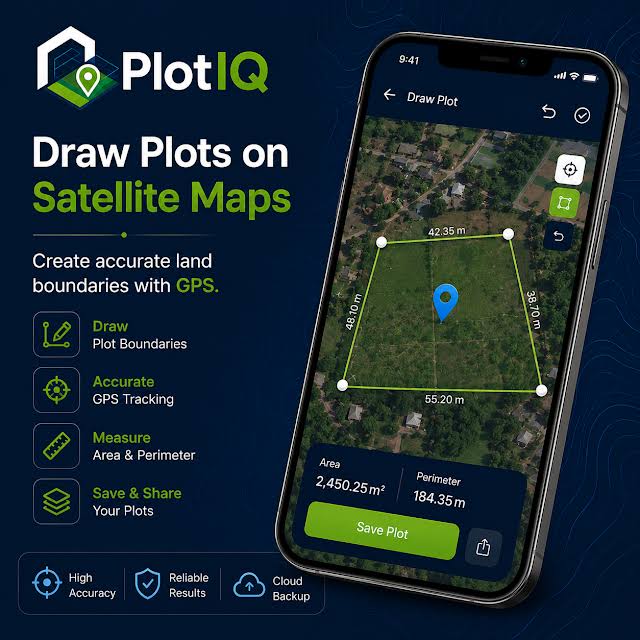
PlotIQ — measuring a plot on a satellite map

PlotIQ

Easy Land Measurement

Accurate land measurement on your phone

PlotIQ is designed for surveyors, engineers, farmers and property owners. Draw a boundary on a satellite map or record GPS coordinates on site to calculate area and perimeter immediately.

  • GPS and satellite maps — draw boundaries on the map or record coordinates on site.
  • Local land units — Decimal, Katha, Bigha, Shotok, Acre, Hectare and more.
  • PDF and CAD export — generate a PDF report or an AutoCAD DWG/DXF file.
  • Saved projects — unlimited projects with cloud backup.

Additional features

Leo

Voice-based practice

Answer questions aloud, as you would in a real interview, to build fluency and confidence.

Leo

CV-based questions

Leo reads your CV and asks the questions an interviewer is likely to ask about your experience.

Leo

Community & voice rooms

Practise with other users who are preparing for similar roles and learn from their experience.

LearnQ

Real exam conditions

Countdown timers, no-backtrack modes and realistic pacing reflect the conditions of the actual test.

LearnQ

Targeted repetition

Questions answered incorrectly are presented again later, so weaker topics receive more practice.

LearnQ

Streaks & milestones

Daily goals and progress milestones support consistent study habits.

IQ Dots

Simple rules

Connect each pair of matching dots and fill the board. Lines may not cross.

IQ Dots

Increasing difficulty

Later levels require planning several moves ahead.

IQ Dots

Relaxed pace

A calm puzzle based on drawing smooth paths rather than fast reactions.

PlotIQ

Any shape of land

Area and perimeter are calculated immediately for plots of any shape.

PlotIQ

Suited to field work

Designed for use on site by surveyors, engineers, farmers and property owners.

PlotIQ

No ads or purchases

PlotIQ is free to use, with no advertising and no in-app purchases.